
agent
The owlette agent is a Python Windows service that runs in the background, monitoring your processes, collecting system metrics, and syncing everything to the cloud. It's the core of the owlette system — every machine you want to manage needs an agent installed.
Two pieces ship to every machine. The service does the supervising — it is what this section is mostly about, and it runs whether or not anyone is signed in. The desktop app is how you see and change what that service is doing while standing at the machine; it is the window below, and it is covered in configuration and the system tray.
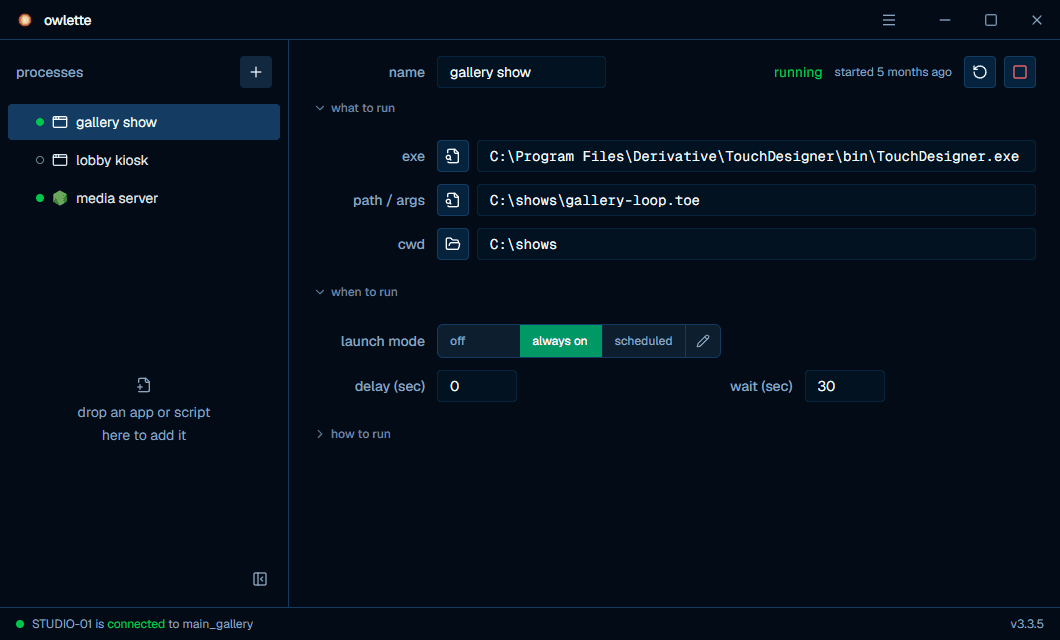
what the agent does
| function | frequency | description |
|---|---|---|
| Process monitoring | Every 5s | Checks if configured processes are running, detects crashes and stalls |
| Auto-restart | On crash | Restarts crashed processes by launching a helper in the interactive user session with CreateProcessAsUser; the helper starts visible apps with ShellExecuteEx and hidden processes with subprocess.Popen. |
| Heartbeat + metrics | Adaptive: ~5s while the desktop app's window is open, 30s while processes are active, 120s idle | Marks the machine online and reports per-device CPU usage and temperature, memory, per-volume disk usage and I/O, GPU usage, VRAM and temperature, per-NIC throughput, and gateway latency and packet loss |
| Commands | Event-driven | Listens for and executes commands written by the dashboard, the public API, and talons rules |
| Config sync | Event-driven | Syncs configuration changes between the desktop app, the service, and the cloud |
how it runs
The agent runs as a Windows service hosted by owlette-host.exe, a small Rust supervisor that ships in tools\ and replaced NSSM in 3.0.0. It registers the service to start automatically on boot, relaunches the agent if it crashes (5 seconds, backing off to 60 seconds once five crashes land inside a five-minute window), and honours the agent's own exit codes: 42 (restart flag) and 43 (self-restart watchdog) relaunch immediately, while a clean exit 0 stops the service.
tools\owlette-host.exe (Service Host)
  └── python\python.exe agent\src\owlette_runner.py (Bridge)
        └── owlette_service.py (Main Service Loop)
              ├── firebase_client.py (Cloud Sync)
              │     ├── auth_manager.py (OAuth Tokens)
              │     ├── firestore_rest_client.py (REST API)
              │     └── connection_manager.py (State Machine)
              ├── command_router.py (Command Dispatch)
              │     ├── sync_commands.py (roost — sync_pull, cancel_sync, rollback_to_version)
              │     │     └── sync_downloader.py, sync_assembler.py, sync_state.py
              │     ├── machine_commands.py (Public-API Commands — capture_screenshot)
              │     └── process_commands.py (Process Control — restart_process)
              ├── sync_scrub.py (roost Integrity Scrub + Orphan-Chunk Reap — hourly check)
              ├── config_sync.py (Config Reconciliation — local, cloud, cached remote)
              ├── shared_utils.py (Config, Logging, Metrics)
              │     └── temp_sensors.py (CPU/GPU Temperature via PawnIO)
              ├── health_probe.py (Startup Health Checks)
              ├── installer_utils.py (Remote Deployment)
              ├── registry_utils.py (Software Inventory)
              └── mcp_tools.py (Remote Command Execution)

Spawned into user session by the service:
  ├── app\owlette-desktop.exe (Desktop App — tray icon, configuration window, reboot prompt)
  ├── owlette_cortex.py (Local AI Agent)
  │     ├── cortex_firestore.py (Message Polling & Response Writing)
  │     ├── cortex_tools.py (MCP Tool Server for Agent SDK)
  │     └── mcp_tools.py (Tool Implementations)
  ├── process_launcher.py (Application Launcher)
  └── session_exec.py (User Session Command Executor)

Launched on demand:
  └── configure_site.py (Device Code Pairing, and the desktop app's back end
        for join / leave site, bug reports and reboot control)
See hoot tools reference for the current tool list.
service lifecycle
startup
- Initialize logging (RotatingFileHandler, 10 MB per file, 5 backups)
- Upgrade config schema if needed (automatic migration)
- Run the startup health probe and publish it to
service_status.json, so the tray can surface a problem before any cloud call happens - Construct the Firebase client (soft-fail: cloud disabled, no site, or no refresh token each leave the machine in local-only mode)
- Acquire the console user token, then launch the desktop app (tray icon) — deliberately ahead of the cloud work, so the operator sees the service starting immediately
- Classify the previous session's end (see below), queueing a warning event that is sent once Firebase connects
- Start the Firebase client: sync config with Firestore, then connect
- Recover running processes (adopt PIDs from previous session)
- Enter the main loop, which launches hoot on its first pass (if enabled)
session state classification
On every startup the agent reads C:\ProgramData\Owlette\tmp\session_state.json (written continuously by the previous run — alongside app_states.json and reboot_state.json) and uses the "alive heartbeat" and any recorded shutdown intent to categorise how the last session ended:
| classification | trigger | behavior |
|---|---|---|
| (silent) | Previous session recorded an Owlette-initiated reboot/shutdown (scheduled reboot, dashboard command, deploy-triggered reboot) | Startup proceeds without alerts — the reboot was intentional |
external_reboot | Previous session ended with a clean shutdown signal but no Owlette intent (operator restart, Windows Update reboot, shutdown command from another tool) | Warning event emitted so the operator can audit why |
unexpected_reboot | No alive heartbeat for long enough to be a reboot, with no clean shutdown signal (BSOD, power loss, hard reset) | Warning event emitted; the gap is reported |
unexpected_service_restart | Service-only restart with no shutdown intent (host relaunch after crash, taskkill, OOM) — the OS stayed up but the service died | Warning event emitted distinguishing it from a full reboot |
The classifier depends only on shared_utils and stdlib — no Firebase, no logging config — so it is safe to import from any agent context (main loop, metrics thread, signal handler, user-space dialogs). Source: agent/src/session_state.py.
main loop (every 5 seconds)
- Check all configured processes — detect crashes, stalls, exits
- Auto-restart crashed processes when launch mode is active
- Firestore commands are processed by the Firebase command listener; the 5-second service loop handles process monitoring, hoot IPC, Firebase enable/disable checks, and periodic maintenance
- Ensure hoot is running (if enabled)
- Process hoot IPC commands (Tier 2 tool calls)
- Check for Firebase state changes (enable/disable)
shutdown
Every operator-initiated stop — console control handler or SCM stop watcher — funnels through one shared path, and whichever trigger arrives first does the work:
- Record the stop locally as a clean external stop, before anything that can touch the network — this local record is what keeps the next startup classifier from reporting
unexpected_reboot - Cap the remaining Firestore request timeouts at 3 seconds, so a stalled call cannot eat the whole shutdown window
- Log the
agent_stoppedevent - Stop the Firebase client — this is the write that marks the machine offline, and it stops the background threads afterwards (offline first, or the write has no transport left)
- Write the final status file saying the service is down
The desktop app is deliberately left running — its footer is where the operator finds start service to bring the agent back.
Source: agent/src/owlette_service.py → graceful_shutdown(), reached from agent/src/owlette_runner.py's signal handler or the SCM stop watcher.
key directories
| path | contents |
|---|---|
C:\ProgramData\Owlette\ | Installation root |
C:\ProgramData\Owlette\agent\src\ | Python source code |
C:\ProgramData\Owlette\app\ | Desktop app — owlette-desktop.exe (tray icon, configuration window) |
C:\ProgramData\Owlette\config\ | Agent configuration, including config.json |
C:\ProgramData\Owlette\logs\ | Service, pairing, and installer log files. The desktop app logs per-user, elsewhere — see agent troubleshooting. |
C:\ProgramData\Owlette\python\ | Embedded Python interpreter |
C:\ProgramData\Owlette\tmp\ | Runtime state — session_state.json, app_states.json, service_status.json, the desktop app's pid files, and the restart.flag the app writes to restart the service |
C:\ProgramData\Owlette\.tokens.enc | Encrypted OAuth tokens |
C:\ProgramData\Owlette\tools\owlette-host.exe | Service host binary — registers the service and supervises the agent |